alt.hn

5/27/2026 at 9:41:14 PM

Sony Launches Bravia 9 II and Bravia 7 II with 'True RGB'

https://www.flatpanelshd.com/news.php?subaction=showfull&id=1779897602

by ksec

6/1/2026 at 9:01:12 AM

What's with the recent trend of putting matte coatings on the most "premium" devices?

This TV does it, the Steam Deck's done it, and it almost always looks terrible (the nano-etching on recent MBPs is _fine_; but still makes the text noticeably fuzzier).

The market for top-end TVs is the people who _really_ care about image quality, why would you jeopardize that with a coating that makes it _worse_?

I'm fine with this being an option for those who want it, but associating "top-end" with matte is bizarre to me. I regularly regret buying the OG 512 GB Steam Deck because the matte coating on it is just so bad.

by klausa

6/1/2026 at 9:07:41 AM

Two reasons: Wider viewing angles and light reflection rejection.

Not every TV is used by two people in a room devoid of lighting. Friends will come over, other things will be watched. Some people are very bothered when the ceiling lighting or sunlight from the window "alters" the image.

Enthusiasts are an interesting bunch. Some features loved by others are grave flaws for others. One can't make everyone happy, so matte screens are an acceptable compromise for it, AFAIK.

My old Bravia is matte-ish without "Viewing angle extending layer", which reduces contrast apparently. I'm happy with what I have. It shows moving images, syncs with sound, and is big enough.

by bayindirh

6/1/2026 at 9:39:00 AM

> Not every TV is used by two people in a room devoid of lighting. Friends will come over, other things will be watched. Some people are very bothered when the ceiling lighting or sunlight from the window "alters" the image.

> Enthusiasts are an interesting bunch. Some features loved by others are grave flaws for others. One can't make everyone happy, so matte screens are an acceptable compromise for it, AFAIK.

You know what, fair enough. I don't mind these; but I do _hate_ the blurriness that the matte coatings introduce.

Now, I wouldn't call my wife a TV tech enthusiast, but I do know that she's bothered by the reflections occasionally when I don't mind, and I know with her eyesight she straight up physically cannot notice the extra blurriness that the coatings bring.

by klausa

6/1/2026 at 10:25:42 AM

And then my wife can't tell the difference between 576p and 2160p, so I guess everyone is different.

by bcraven

6/1/2026 at 11:01:09 AM

> I do _hate_ the blurriness that the matte coatings introduce

Doesn't apply in this case, does it? Can you really see it watching media on a large TV at the usual viewing distances?

by buran77

6/1/2026 at 12:54:21 PM

I haven't noticed blurriness really.

I have noticed that the darkest "black level" is less black (despite it being OLED screen) than on glossy screens in light conditions. That difference disappears in darker environment.

by izacus

6/1/2026 at 10:13:18 AM

Once the screen is 10ft away I doubt any human alive could perceive a sharpness difference from a nano texture.

by drcongo

6/1/2026 at 11:25:45 AM

I’d now be actually curious to do a Pepsi-style challenge to test this on myself.

I give myself a ~low 40% chance of being able to tell within a minute when watching a TV show/movie _without subtitles_, maybe 60%ish with subtitles, and maybe low 80% if I was playing a game with any amount of text rendered on the screen.

by klausa

6/1/2026 at 11:55:24 AM

You don't really need to do a challenge: https://i.rtings.com/images/optimal-viewing-distance-televis...
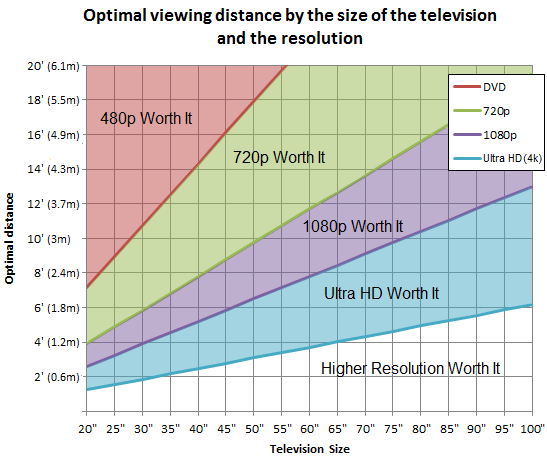
If you own a 50" 2160p ("4K") TV and are sitting more than 1.8m / 6ft away, you're already at the edge of being able to perceive any resolution increase over 1080p. For a 65" TV, its about 2.5m / 8ft.

So no, at typical viewing distance you are very unlikely to notice a sharpness decrease.

Tangentially related, but this is also why the 4K chase on this console generation is so stupid. The vast, vast majority of people will be viewing their TV way beyond the recommended viewing distance, and thus will only be resolving to 1080p with their eyes. We should be chasing better-looking effects and 120 FPS.

by jorvi

6/1/2026 at 12:13:05 PM

I’m at 65” and less than 2m away, and I absolutely can tell when text is not rendered at native resolution, which is why I’m also confident I’d be able to notice the matte coating too.

(I am also probably like three standard deviations _more annoyed_ by the blurriness than an average person, I’m more than willing to believe that an average person wouldn’t be able to tell, or at least wouldn’t be bothered by it anywhere close to the degree that I am.)

by klausa

6/1/2026 at 1:33:39 PM

Well yeah, at that distance you are supposed to notice the difference in resolution, and presumably the difference between matte and glossy. Most living room situations aren't like that though.

Btw, that page in general is great if you want to optimize your viewing experience: https://www.rtings.com/tv/reviews/by-size/size-to-distance-r... :)

I'm also someone who cares enough about fidelity to do 10-point tuning on my displays and speakers, so I get your frustration!

by jorvi

6/1/2026 at 11:29:20 AM

Because matte vs glossy is a separate discussion from cheap vs premium. The former is about marching the expected viewing conditions and the latter is about how advanced it tries to be about doing so. If you want the most optimal possible viewing experience you need to combine multiple aspects like that, not just buy a premium device.

by zamadatix

6/1/2026 at 11:49:45 AM

> Because matte vs glossy is a separate discussion from cheap vs premium.

My whole complaint is that it increasingly isn’t!

If I wanted a “premium” variant of Steam Deck, I had no choice to opt out of matte coating.

If I want the best TV panel possible from Sony, it only comes with the matte coating.

I’m fine with the option for matte being there for folks who like this! I just want to be able to opt-out of it, if I still want the “best” among other axes.

by klausa

6/1/2026 at 11:59:48 AM

This echoes the tug-of-war customers are having over controller (and Steam Deck) size haha. People with big hands think the Steam Deck and PS5 controller are perfect and the Switch and PS4 controller suck. People with small hands feel the exact opposite.

The option is either clever engineering or choice. Apple chose the engineering route with their nanotexture screen coatings. Microsoft has done it with the XSX controller, which has clever cut-outs so people with small hands (kids) can hold it in a different but still-comfortable way. Hopefully TV OEMS figure out a way to ape Apple.

by jorvi

6/1/2026 at 1:12:59 PM

About half the time in the last few years Sony's flagship OLED and Mini LED options have been glossy. When they haven't, they've been semi-glossy. Short of every model being duplicated, 50% of the time is all one can hope for.

by zamadatix

6/1/2026 at 9:57:10 AM

I just don’t want to be reminded how I look like while using these devices, it’s really distracting to me.

If I wanted to know what I look like, I use a mirror.

by kawsper

6/1/2026 at 11:08:48 AM

I haven't had any problems with the Deck's matte coating, but if it really bothers you, you can replace the screen, they're $40, and the Deck was designed to be repairable.

by hgoel

6/1/2026 at 12:34:50 PM

That's the wrong way around. Matte is better for performance but gloss attract consumers so Apple puts "Pro" and glossy front in the same product. Actual pro displays are always matte, a bit like how actual pro cameras always have non-clicking shutter buttons but reviewers point that out as a con.

by numpad0

6/1/2026 at 9:16:55 AM

I explicitly bought a high-end matte TV (Samsungs S95D) because of the coating - I like having light in my living room which means a lot of reflections from windows and other lights.

Matte coating pretty much solved all my issues with glare and reflections and I don't have to sit in darkness while watching things anymore, it's great. The tradeoffs are negligible and appear in situations where other TVs would be unwatchable. It's been a bigger QoL upgrade than actually switching to OLED.

by izacus

6/1/2026 at 9:36:59 AM

Is it fully matte, like on a desktop monitor, or is it some "reflection reduction" semi-gloss/semi-matter whatever magical coating?

by klausa

6/1/2026 at 12:51:27 PM

I can't really say - there is an obvious film on it. The light/reflections turn into a very diffuse, barely visible lighter spot.

by izacus

6/1/2026 at 9:32:10 AM

Yeah we have one of these in our kitchen diner and it's excellent.

by thom

6/1/2026 at 8:39:46 AM

On my PC, the site displays a weird "Your browser is not Javascript enable or you have turn it off. We recommend you to activate for better security reason" banner on the top... not sure if it's my ad blocker that messes up some CSS styles that makes this appear, but the message is weird in any case.

EDIT: no, it's not the ad blocker. The <noscript> tag is empty, and that string floats in the source near the <title> tag.

by ale42

6/1/2026 at 8:56:43 AM

I got a lot of ads related messages and I can tell you, this site works much better by actually disabling javascript!

by gbil

6/1/2026 at 11:32:21 AM

In any case "We recommend you to activate [JS] for better security reason" sounds quite ridiculous...

by ale42

6/1/2026 at 10:17:43 AM

Are these "pure" Sony or from new JV with TCL?

by blackoil

6/1/2026 at 11:41:17 AM

This is their last hurrah where Sony is primarily in control (yes, the panels are from LG et al. and the main processor is a Mediatek, sheesh). The TCL JV will formally commence in FY 2027 (April 2027).

by zinekeller

6/1/2026 at 11:13:37 AM

there are no pure Sony TVs for decade(s), they use third party panels with extra steps

by Markoff

6/1/2026 at 9:06:44 AM

As some commenters pointed out, this is basically slowly adding a real RGB led panel behind the LCD, or an OLED with extra steps. I could not see prices but I would expect this to be significantly cheaper, or maybe the refresh rate is much better than OLED.

by ptsneves

6/1/2026 at 9:09:37 AM

The advantage is, it's cheaper, can provide better color accuracy, and won't burn in as bad as OLED since LEDs have much longer lifespan w.r.t. OLEDs.

I still can't accept to use OLEDs in TVs and computer screens. Both has much higher duty cycles w.r.t. phones and tablets, and I hate burn-in.

by bayindirh

6/1/2026 at 11:35:42 AM

RTings has done multi-year burn-in tests and OLED TVs have an exceptional lifespan before burn-in these days, I honestly don't know what motivates this particular concern any more. You'll probably have the caps fail before you notice anything, maybe even multiple rounds if you recap it.

by crustaceansoup

6/1/2026 at 12:03:44 PM

I have looked to the same burn-in tests actually, and they were just starting doing it. Some of the screens got burn-in pretty quickly.

Yes, screens have improved vastly since the first days, but my life expectancy of these devices is much longer than a ordinary consumer. I don't change a TV every 5 years.

Yes, my duty cycle is much lower than the ones gone through testing, but having one less failure point for my screens is always better. Also, I'm not a nitpicky person about contrast numbers and whatnot. If I enjoy the thing I'm occasionally watching, I'm more than fine.

by bayindirh

6/1/2026 at 11:32:41 AM

Having had OLEDs for a while now and never experiencing burn in even in my monitor I believe this issue is either very overblown by the small amount of bad experiences and requires a large amount of misuse before it becomes a problem.

by lnenad

6/1/2026 at 12:05:42 PM

I have seen burn-in personally in my couple of early OLED devices, and saw them pretty quickly, so when I was buying my only TV and seen that RTINGS tests, I decided on an LCD.

My OLED devices fared fine for a lot of years, but I'm not sold on OLED on large surfaces, and a good quality, dynamic backlit LCD is more than enough for my needs.

by bayindirh

6/1/2026 at 12:36:46 PM

I don't know what "early" represents for you so cannot comment on that but my close to 10 year old 55 inch tv still doesn't have it.

Either way there's something about OLEDs that my eyes prefer, I cannot verbalize it. Maybe it's placebo :)

by lnenad

6/1/2026 at 11:50:32 AM

>I could not see prices but I would expect this to be significantly cheaper, or maybe the refresh rate is much better than OLED.

The 55" Bravia 7II is listed as 2300 Euro. I paid like 1600 Euro for my 55" LG OLED tv a couple of years ago. Of course Sony is generally a more reputable brand (and LG's WebOS sucks) and consumer prices have been going up, but price doesn't seem to be the differentiator here.

by ginko

6/1/2026 at 9:01:24 AM

In every store demo people go to the TV with the most vibrant colors even if they're unrealistic. You can't even tell which is the color you're expected to see sometimes.

I have the movie "Once Upon a Time in America" in 2 different editions and the colors were remastered, they look very different between the 2 copies, yellowish vs. reddish. If the source material is already like this, having super color fidelity in the panel is a paper checkmark but not super useful in practice. Maybe the 2000nits brightness in case I mount the TV in direct sunlight.

This will attract a few people who are very focused on these details, and a lot of people who are very focused on the spec sheet.

by close04

6/1/2026 at 11:14:33 AM

You mean TCL owned "Sony" Launches Bravia 9 II and Bravia 7 II with 'True RGB'

why go extra steps and not buy directly from TCL or LG (though they are shutting down soon as well and their system is crap comparable to Samsung's Tizen)

by Markoff

6/1/2026 at 11:33:39 AM

Bugatti? Why go extra steps and not buy directly from Volkswagen?

by medlazik

6/1/2026 at 9:09:22 AM

I have a 2024 Bravia (K-77XR80) because I wanted an OLED TV with Android TV, to avoid yet another vendor spying on me (Google already does). I also hoped that a "premium" brand like Sony would offer a better UX than other brands.

Well, I was wrong. Watching movies on OLED (or at least on this particular OLED) looks crap, because if you turn motion interpolation OFF, the image looks stuttery, apparently due to OLEDs ultra-low response time, which produces zero fading between adjacent frames. (By the way, why didn't this happen with 35mm movie projectors? They couldn't blend adjacent frames either, because they are just shining light through individual pictures on a sheet of celluloid, yet I don't remember seeing this kind of stutter in movie theatres back in the day!) And turning motion interpolation up a notch already produces the well-known soap opera effect. No, thanks.

The UI is laggy. It's as if Sony used a chipset that couldn't handle Android TV driving a 4k display or something. And to make things worse, the UI had to be filled with all kinds of animated transitions, which of course make lagging even more noticeable. If there was one thing to learn from Apple in the past 20 years, it's that a consistent UI framerate must be prioritized over everything (except maybe realtime audio). Dropped frames = cheap, trash UX.

Also, apparently all OLED TVs must periodically do these "pixel refresh" cycles, to lengthen the lifespan of the panel. Fair. But in Sony TVs this is scheduled a few hours after the TV was turned off, and the schedule cannot be configured. The operation itself is invisible, but when the TV comes alive to do this panel maintenance it produces AN AUDIBLE RELAY CLICK like a fucking CRT TV from the 90s. You watch some TV before going to bed, then in a few hours wake up to the sound of a solenoid switch. Then after about 5-10 minutes, the relay clicks again to power off the device, so if you didn't wake up to the first click, now there's a second chance! Yay! And I can confirm this relay sound isn't unique to this particular Bravia model, because I have a smaller one in the bedroom, and it's the same. (See also on Reddit: https://www.reddit.com/r/bravia/comments/vx2efk/sony_a80j_i_...)

Premium brand, my ass.

TL;DR: don't buy Sony TVs.

by meindnoch

6/1/2026 at 10:24:55 AM

Well when I got my first job at uni I bought a bravia tv just before Android TVs came out (around 2014 here), so it had whatever it was the OS before it and it was cheaper than the regular price.

Since Android TV and Google TV became the de facto OS for most of "premium brands", they stopped updating my TV around 2019 or so, and apps a bit after that. The youtube app became even more sluggish and slow, all other third party apps were gone. A couple years ago my sister messed with my TV so I did a factory reset and with that the youtube app went away too. Now it has only screen mirroring.

Which turned out to be absolutely great - I got to have a "premium brand" TV that I can keep it connected to the internet and use screen mirroring and send commands to it via its IP but it won't show any ad whatsoever because its OS is long outdated. And after 12 years everything but the "smart" part of it is working great as new. Of course it's not OLED whatsoever but I can't really care less - viewing experience is still great.

by Gualdrapo

6/1/2026 at 10:37:02 AM

I bought a bravia tv around 2014 without any smart features and it stills works absolutely fine.

by dsego

6/1/2026 at 10:43:35 AM

> apparently due to OLEDs ultra-low response time, which produces zero fading between adjacent frames. (By the way, why didn't this happen with 35mm movie projectors? They couldn't blend adjacent frames either, because they are just shining light through individual pictures on a sheet of celluloid, yet I don't remember seeing this kind of stutter in movie theatres back in the day!

35 mm film projectors usually interrupt the light 3 times per frame, and switch frames while the light is interrupted. Some projectors only interrupt the light twice per frame, but I think those were earlier projectors. By your description, on an OLED the pixels just change to the new frame, with no transition. You might prefer an OLED with black frame insertion? (Although, I have an LCD with that and it gives me headaches)

by toast0

6/1/2026 at 10:24:22 AM

> By the way, why didn't this happen with 35mm movie projectors? They couldn't blend adjacent frames either, because they are just shining light through individual pictures on a sheet of celluloid, yet I don't remember seeing this kind of stutter in movie theatres back in the day!

Normally you’d shoot at 180 degree shutter angle (exposure time is half the frame time). This produces a “cinematic” blur that doesn’t look choppy, especially when projected at the same rate. So if you’re shooting 24 fps video, try shooting at 1/48. This is slow compared to most handheld still photography, which is why you start to need ND filters on cine cameras, especially if you also want to shoot wide open.

Stutter is particularly noticeable for fast panning landscapes where there’s uniform motion across the entire frame. Very obvious if there are “gaps” in the blur because your brain will want to interpolate. If there are static/foreground objects, you probably won’t notice.

by throwaway219450

6/1/2026 at 10:22:42 AM

It still blows my mind that no OLED TV has yet added simple temporal blending between frames, the kind of which MPV has had for decades. They could even take it a step further and emulate the colour-dependent blending of LCD screens. But no instead it's the same terrible motion interpolation algorithms of 15+ years ago, or nothing.

by kiririn

6/1/2026 at 11:22:59 AM

> If there was one thing to learn from Apple in the past 20 years, it's that a consistent UI framerate must be prioritized over everything (except maybe realtime audio).

Not upgraded to macOS 26 Tahoe yet?

by steve1977

6/1/2026 at 11:23:26 AM

Sonoma going strong here ;)

by meindnoch

6/1/2026 at 9:17:13 AM

Interesting issue on the UI lag. My 2022 4K Sony has no lag whatsoever.

Vision persistence with high intensity light is an interesting phenomenon. This is why people still love CRTs, too. OLEDs do not create that much of a light by themselves, so no persistence of vision is present.

Also, why an audible click is so bothering? I can't fathom that part, sorry. Nitpicking much? BTW, I'd rather have a proper relay in my devices rather than a high-power MOSFET which can short and has a shorter lifespan.

Your comment reminds me a couple of blog posts. One person wrote a 2500 word essay on something they hated so much. Then the thing got tuned or serviced or something, then they wrote 3000 word essay on how they love it. The kicker? The feature they hated most in the first was the feature they loved the most in the second one.

by bayindirh

6/1/2026 at 9:32:33 AM

>Interesting issue on the UI lag. My 2022 4K Sony has no lag whatsoever.

Is it running Android TV?

>Also, why an audible click is so bothering? I can't fathom that part, sorry. Nitpicking much?

I would have expected a device that people put in their bedrooms to be silent. Or at least have an option in the settings to produce loud clicks at a different hour instead of 3am?

by meindnoch

6/1/2026 at 9:38:13 AM

Yes, it's running Android TV. It also had some major updates along the way, and is still getting updates.

Personally I don't have such an expectation from my devices. Configurability would be nice, I agree, but no, I don't expect everything to be "solid state" in 2026.

by bayindirh

6/1/2026 at 10:08:30 AM

> Watching movies on OLED (or at least on this particular OLED) looks crap, because if you turn motion interpolation OFF, the image looks stuttery, apparently due to OLEDs ultra-low response time, which produces zero fading between adjacent frames. (By the way, why didn't this happen with 35mm movie projectors? They couldn't blend adjacent frames either, because they are just shining light through individual pictures on a sheet of celluloid, yet I don't remember seeing this kind of stutter in movie theatres back in the day!) And turning motion interpolation up a notch already produces the well-known soap opera effect. No, thanks.

My guess would be that it's not so much a difference between projectors and OLEDs as it is a difference between old movies and new movies.

Personally I think that slow pixels is the wrong way to "fix" poor motion blur in movies.

by jeppester