alt.hn

4/10/2026 at 6:39:19 PM

Show HN: FluidCAD – Parametric CAD with JavaScript

https://fluidcad.io/

by maouida

4/10/2026 at 8:38:58 PM

I'll throw my hat in on the feedback... looks great!

https://github.com/openscad/openscad/pull/4478#issuecomment-...

My pet use case is: "My naive approach as a programmer would be: `pen := new Pen(q,r,s,t); box := new Box( pen.L, pen.W, pen.H )`" along with being able to sometimes work with the whole pen, and sometimes touch the pen vs. the cap separately.

Since it's all javascript, it seems like there's a chance that this use case would work (ie: `p = Pen(...).render().getWidth()`)? Additionally, your intermediate step screenshots really makes it seem like a SketchUp-ish GUI would be perfect! Obviously a ton of work, but SketchUp's "grab face + extrude / push", but if it were "sticky" to the underlying parametric components seems like it'd be an awesome combo... something like group/components, but backed by code instead of GUI-only (or GUI-centric) editing.

by ramses0

4/11/2026 at 6:16:20 AM

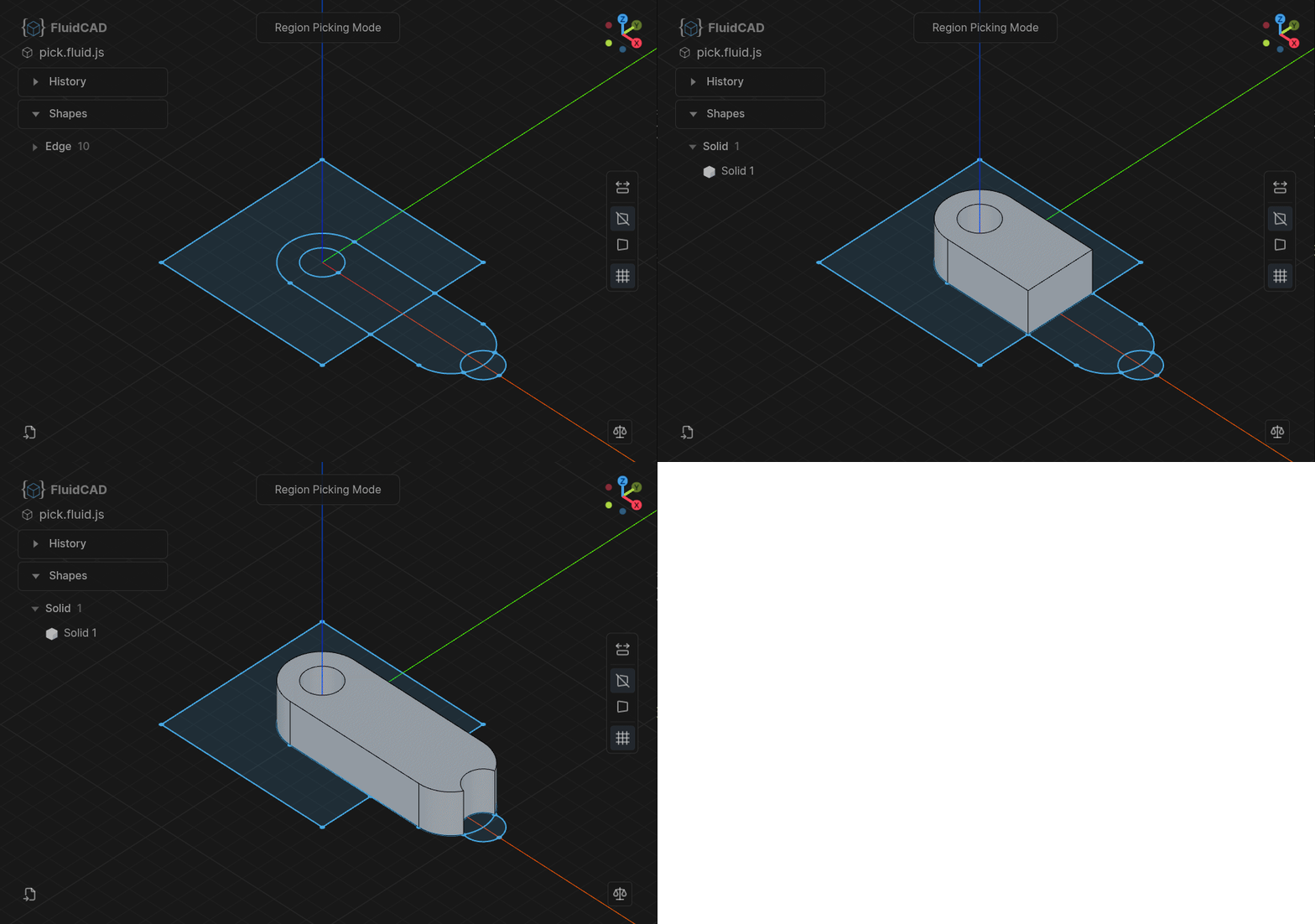
The interactive region extrude feature is designed specifically for fast modeling at the expense of making the model "not so parametric". When user pick a region, the raycasted point is inserted/hardcoded in the code. e.g extrude(100).pick([100, 100]) So if the sketch dimensions change, there is a chance the point will fall outside the region boundaries which will break it. It is preferred to use proper boolean operations in sketch mode to define regions while keeping it parametric.

The interactive region extrude is there for when you want fast modeling/prototyping.

by maouida
4/11/2026 at 9:01:21 AM

This is nice, though I think the use of indices instead of stable identifiers might bite in complex models that undergo changes. I've been toying with the idea that you could specify a point (2D or 3D in some coordinate system, depending on context) and pick the face/edge/point closest to that as the identifier. The only other alternative I see is diffing old and new, and trying to match the outputs of each operation geometrically, but that would produce extra output that needs to be persisted...

E.g. when splitting a face in OnShape, I might have to redo a whole bunch of operations later because the identifiers change, but I'm often surprised how good it is at matching up faces after a single operation. Like modifying a sketch, then having to add the new face to an extrusion, but then it magically does the right thing for chamfers and drafts.

by flowerthoughts

4/11/2026 at 9:20:45 AM

Yep, topological naming solving is a hard problem to solve. It took FreeCAD many years to get it to work correctly. That's why I went with indices for this version. You can also use filters like extrusion.endFaces(face().arc()) to get only arc edges.

Regarding the picking; that's exactly the region picking feature in this screenshot: https://fluidcad.io/img/region-extrude.gif

When the user click on a region we insert a 2D point, then the extrude feature will find the nearest face. I have experimented with adding this picking logic to selections too select().pick() which will probably be merged in future releases.

by maouida

4/11/2026 at 2:37:33 AM

These code base cad systems are pretty great. But all of them are imperative languages and as such can only solve imperative constraints. Including declarative constraints would be very welcome. I mean, sure, Theoretically we could enter the turing tarpit and build our own constraint solver, but it would be nice to see one included as a standard library.

I am trying to think of an example, declarative constraints are usually the domain of a graphical cad system(like solvespace). but I suspect it would look like a set of relationships you can enter in any order and it solves for the missing one. so... prolog? has there ever been a cad system in prolog?

by somat

4/11/2026 at 6:12:01 AM

The constraints solving took a good amount of thinking while designing FluidCAD. At first I tried to make it all declarative where user just create unconstrained geometries then define constraints, something like: const l1 = line(); const c1 = circle(); // define constraint l1.length(100).position(x, y).tangentTo(c1) ...

Then I decided against this idea because it results in too much typing + the constraint solver implementation is not trivial and there is not much web based open source solvers. I went with a mixed approach instead between declarative and imperative. https://fluidcad.io/docs/guides/sketching/constrained-geomet...

by maouida

4/11/2026 at 9:25:50 AM

This is a really interesting direction.

Using JavaScript for parametric CAD feels like it could significantly lower the barrier compared to traditional CAD tools.

Curious — how do you handle performance for more complex models? Especially when the dependency graph grows large.

by c_chenfeng

4/11/2026 at 9:42:01 AM

I have added a caching mechanism; objects are computed only when their parameters change. When an object change, all objects after it will recompute. This will probably need to be revised in future with more efficient algorithm to find what objects are affected by the change and recompute only those.

by maouida

4/10/2026 at 10:03:17 PM

This looks incredible, great job!

I've been revisiting OpenSCAD recently but find it very frustrating. I just got started with build123d which is great but I'll definitely be trying this. The workflow is exactly what I'm looking for.

I'll drop an issue if I have feedback. Are you open to PRs?

by isaacphi

4/11/2026 at 5:57:45 AM

Yes, PRs will be open on v0.1.0 I just want to finalize some design decisions and create a roadmap first.

by maouida

4/10/2026 at 8:30:23 PM

The thing that made Flash magical was that it had the approachability of a design tool (and it really did have some of the best design tools ever), with the extensibility of a scripting language. You could start by drawing on a canvas and grow into programmatically generating designs.

This looks like it could do the same thing for constraint modeling. That's awesome!

by bsimpson

4/10/2026 at 9:58:45 PM

I don't know much about CAD but it is surprising to me this hasn't existed before seems so natural. great work

by upcoming-sesame

4/10/2026 at 10:06:57 PM

It’s got plenty of precedent - AutoCAD has a Lisp equivalent since 1986[1]. Arguably it is what made it the powerhouse CAD tool.

Irrespective - This project is pretty cool to see!

[1] https://en.wikipedia.org/wiki/AutoLISP

by jwilliams

4/10/2026 at 8:31:17 PM

Nice work and kudos for programming it by hand! Starred the project and plan to try it out soonish.

by unforbiddenYet

4/10/2026 at 10:12:00 PM

Impressive to see parametric CAD running in the browser. Curious how you handle precision with floating point — that's usually the first wall you hit with geometry in JS. Does it support STEP or DXF export?

by kabir_daki

4/10/2026 at 7:07:17 PM

Why use this rather than Maker.js?

https://www.microsoft.com/en-us/garage/profiles/maker-js/

by WillAdams

4/10/2026 at 7:41:11 PM

One obvious difference I can see at a glance is that Maker.js doesn't support 3D models, while FluidCAD does. I assume Maker.js is a lower level library aimed at interfacing directly with CNC machines, while FluidCAD is focused on 3D design.

by astroalex

4/10/2026 at 7:50:37 PM

Maker.js is supposed to also support openjscad (or whatever they're call it these days, the JavaScript enabled version of OpenSCAD).

by WillAdams

4/10/2026 at 7:19:58 PM

This looks great. I just started trying to generate some models using golang and the ecosystem doesn't seem great. Will check this out, might work out better.

by CWIZO

4/10/2026 at 9:57:09 PM

Really interesting! Is there a list of all supported CAD operations? Can I “revolve” 2D sketches? Can I make assemblies?

by gitgud

4/11/2026 at 5:58:58 AM

Most of the CAD operations are supported, some are just basic implementations which will be improved soon. https://fluidcad.io/docs/category/3d-operations

Assemblies will come but not anytime soon. I did some research and tests and it is going to be a challenge. You can still add multiple parts in one scene but no actual joints implementation.

by maouida

4/10/2026 at 8:46:15 PM

I've been working on this exact idea! But it's late, will remember to come back and check this out to compare notes.

by interstice

4/11/2026 at 5:57:45 AM

Looking at this now, I like the approach! It's also fundamentally different from mine (maybe phew). The mouse driven approach makes it far more approachable, while mine is deliberately code driven and perhaps more quirky (step export is a code function for example).

Also looking at your API, I used a vector type a lot for defining things like planes, so where you have sketch("xz",func) mines a little more like plane(vec).sketch(). How are you handling sketching directly on arbitrary planes or faces etc?

by interstice

4/11/2026 at 6:05:47 AM

It seems from what you are describing your software is more like (replicad)[https://github.com/sgenoud/replicad]

The user can create planes with plane() command e.g plane("xy") or plane("xy", { offset: 10 }); but I have added some shortcuts for common planes (https://fluidcad.io/docs/guides/sketching/introduction#sketc...)

you can also sketch on faces sketch(extrusion.endFace(), ...) which will extract the plane from face and put the starting point on the center for convinience.

by maouida

4/11/2026 at 5:41:31 AM

That looks amazing

by AmmarSaleh50

4/10/2026 at 7:34:56 PM

This looks awesome.

by shocks

4/10/2026 at 7:04:36 PM

What geometry kernel is it using?

Which operations are supported? (Booleans? ...)

Where's the API link?

...finally, was this vibe-coded?

Inquiring minds want to know!

by alterom

4/10/2026 at 7:11:36 PM

Based on opencascade wasm. Features in the docs. Api coming soon. No it was not, I started this before I even started using coding agents. It took many iterations and rewrites before settling on the current shape. After building the core features I started using claude to add more features, improve test coverage and generte docs.

by maouida

4/10/2026 at 8:53:28 PM

Thanks!

> Features in the docs

The Docs section of the website has "Installation", "Editor setup", and "Your First Model".

Not a list of operations/features.

The front page lists some (extrusion, fillets), but not all.

Is the entirety of OpenCASCADE exposed to the user via the JS API, or are you only supporting a curated subset?

by alterom

4/10/2026 at 8:57:26 PM

You are welcome.

There is a guide section and one tutorial: https://fluidcad.io/docs/guides/

This week will be all for documentation.

It is only a subset of features focused on solid modeling. Surface modeling will come in future versions

by maouida

4/10/2026 at 10:56:10 PM

> ...finally, was this vibe-coded?

Reminds me the days when I created a Windows app for accounting and someone asked did you code it in C++ Builder? As if writing form scaffolding by hand was sign of a skilled developer.

What I am trying to say - who cares? Most software create by one person is vibe coded, just with the AI, you don't have to spend ages typing actual code that you would have eventually typed anyway.

by varispeed